
A YouTube channel does not need a recognizable face to build an audience, attract viewers, or generate revenue. Many successful content formats rely on storytelling, educational explanations, animations, screen recordings, documentaries, and voiceovers rather than an on-camera personality. This creates an opportunity for entrepreneurs who want to learn how to start a faceless YouTube automation business without becoming the face of their brand.
However, building a profitable channel requires more than uploading videos regularly. You need a clear niche, a content strategy, an efficient production workflow, strong video packaging, and a realistic understanding of YouTube monetization. This guide explains how to build the business from scratch, choose the right niche, produce videos, manage operations, and turn a channel into a potential source of income.
1. What Is a Faceless YouTube Automation Business?
A faceless YouTube automation business is a content-based business in which you operate a YouTube channel without appearing on camera. Instead of presenting yourself in every video, you publish content using narration, stock footage, animations, screen recordings, slides, illustrations, or other visual formats.
The word automation refers to creating an organized production process that reduces repetitive work. It does not mean that the entire business runs without human involvement.
For example, imagine you create a channel about technology and business. Your videos might cover:
- How successful technology companies make money.
- The history of famous brands.
- Emerging business opportunities.
- Interesting inventions and innovations.
- Explanations of software and digital products.
You research each topic, prepare a script, record narration, collect appropriate visuals, edit the video, and publish it.
Once the channel grows, you can delegate certain responsibilities to freelancers, such as video editing, thumbnail design, and script research.
The main idea is simple: Build a recognizable content brand rather than building a personal brand around your face.
2. How Does YouTube Automation Actually Work?
A faceless YouTube business operates through a series of connected activities. Each activity contributes to producing and distributing videos.
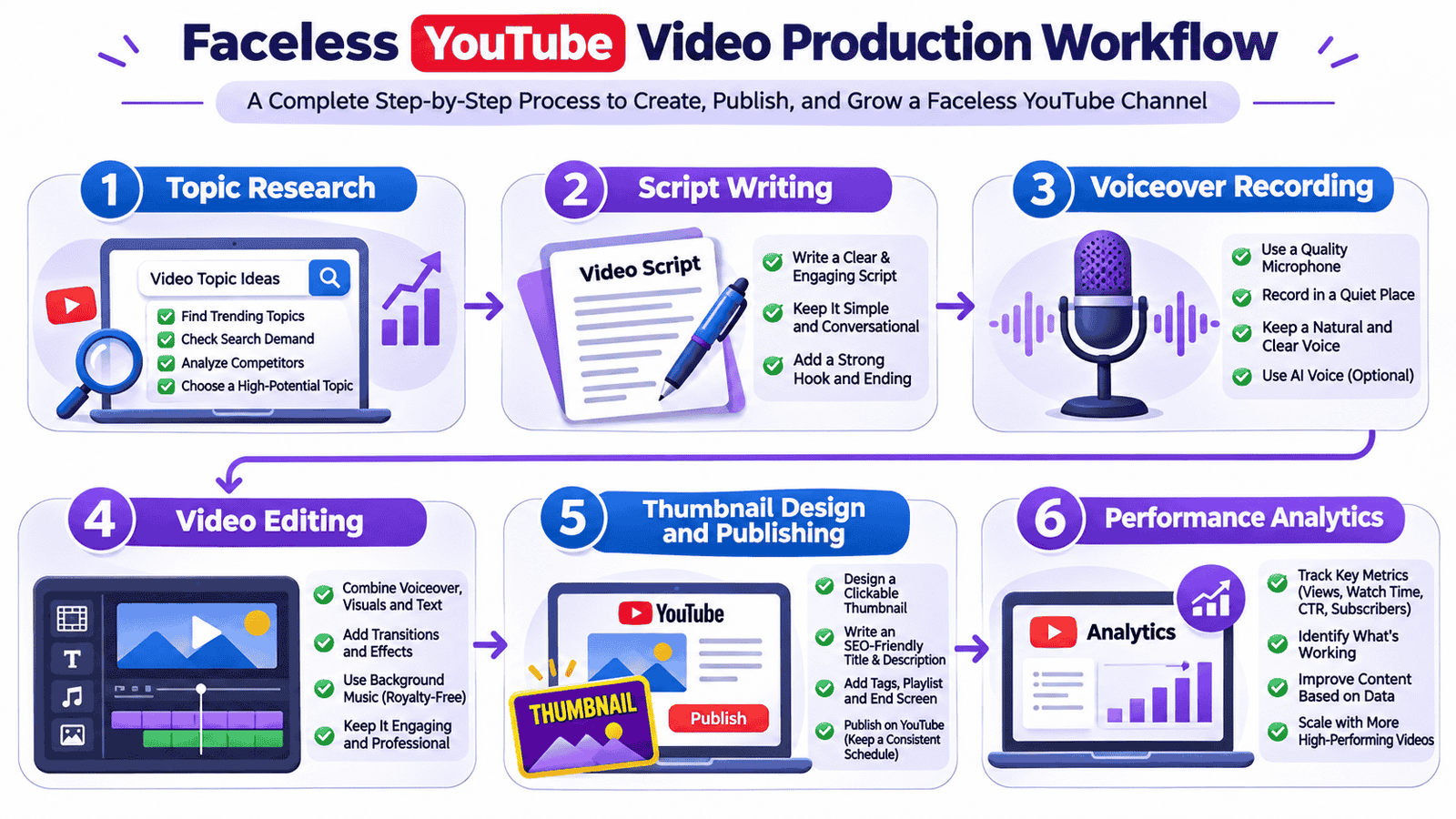
Here is a typical workflow:
 Step
1: Topic Research
Start by identifying subjects that people are interested in watching. Research search suggestions, trending discussions, competitor channels, and questions that your target audience frequently asks.
Step 2: Script Development
Prepare an original script that explains the subject clearly. A good script should have an interesting opening, a logical sequence of information, and a satisfying ending.
Step 3: Voiceover
Record your own narration or hire a professional voice artist. You can also use suitable text-to-speech services, provided the resulting content meets YouTube's originality and quality requirements.
Step 4: Video Editing
Combine narration with relevant footage, animations, screen recordings, graphics, subtitles, and background music.
Step 5: Thumbnail and Publishing
Create an attractive thumbnail, write a descriptive title, prepare the video description, and publish the video with an appropriate audience category and settings.
Step 6: Performance Analysis
Review YouTube Analytics to understand which videos attract viewers, how long people watch, and where they stop watching.
The process becomes easier when you establish templates, checklists, and repeatable production standards.
3. Choose a Profitable YouTube Niche
Your niche is one of the most important decisions because it determines your audience, content direction, competition, and potential revenue opportunities.
A common beginner mistake is choosing a niche simply because another channel is getting millions of views. A popular niche is not automatically a good business opportunity.
Instead, look for a subject that combines audience demand, sustainable content ideas, manageable competition, and commercial potential.
Best Faceless YouTube Niches to Consider

1. Technology and Innovation
Explain new technologies, software, cybersecurity concepts, gadgets, and technological developments. Screen recordings and animations work particularly well.
2. Business and Finance Education
Cover business models, entrepreneurship, company histories, budgeting concepts, and financial education. Accuracy and trustworthy explanations are essential.
3. History and Documentaries
Explore historical events, civilizations, biographies, and significant discoveries using original narration and carefully selected visuals.
4. Science and Education
Explain scientific concepts, space exploration, human biology, and everyday science through illustrations and educational animations.
5. Luxury and Lifestyle
Create content about luxury properties, automobiles, architecture, travel destinations, and premium products.
6. Geography and Interesting Facts
Cover countries, cultures, unusual places, geographical discoveries, and interesting facts about the world.
How to Evaluate a Niche Before Starting
Before committing to a niche, evaluate these factors:
|
Factor |
What to investigate |
|
Audience demand |
Are people actively watching this content? |
|
Competition |
Can you create something different from existing channels? |
|
Content availability |
Can you produce at least 50–100 original topics? |
|
Production cost |
Can you make videos within your budget? |
|
Monetization |
Are there relevant advertising and sponsorship opportunities? |
|
Long-term potential |
Will people still be interested in the subject next year? |
Choose one niche initially. A channel covering technology, cooking, history, and motivational quotes simultaneously may struggle to establish a clear audience.
4. Research Your Audience and Competitors
Before publishing your first video, spend time understanding what is already working in your selected niche.
Competitor research is not about copying another creator. It is about identifying audience interests, presentation styles, content gaps, and opportunities to produce something better.
Useful Research Methods
YouTube Search: Enter your main niche keywords and examine the videos appearing in search results. Pay attention to titles, thumbnails, topics, and video formats.
Google Trends: Compare topics to understand whether interest is increasing, declining, or seasonal.
YouTube Analytics: Once you start publishing, use your own performance data to identify successful topics and audience preferences.
Competitor Analysis: Examine several established and smaller channels. Look for questions they have not answered, outdated explanations, and subjects receiving consistent viewer interest.
Find Content Gaps
Suppose you want to start a technology channel.
Existing creators might publish videos about the latest smartphones, but relatively few may explain how smartphone operating systems work, how mobile applications are developed, or how technology companies generate revenue.
These gaps can become opportunities for original content.
A useful approach is to create a spreadsheet containing:
- Video topic
- Target keyword
- Competitor examples
- Search intent
- Suggested title
- Content angle
- Research sources
- Publishing status
This simple system prevents random uploads and helps you build a consistent content strategy.
5. Build Your Faceless YouTube Channel
Once you have selected a niche, establish the channel's identity.
A professional channel should look consistent across its profile, banner, thumbnails, video style, and descriptions.
Choose a Memorable Channel Name
Your name should be easy to pronounce, relevant to your niche, and flexible enough to accommodate future content.
For example, a technology documentary channel could use a brand name associated with innovation, discoveries, or digital knowledge.
Avoid names that are difficult to spell or unnecessarily long.
Design Your Channel Branding
Prepare the following elements:
- Channel logo
- YouTube banner
- Channel description
- Brand colors and typography
- Thumbnail design template
- Introductory channel video, if useful
Configure Your Channel Properly
Visit YouTube Studio and complete the basic channel settings.
Set up:
- Channel name and handle.
- Profile picture and banner.
- Channel description.
- Relevant channel keywords and links.
- Audience settings.
- Upload defaults.
- Two-step verification and account security.
You should also create a dedicated business email address for professional communication, sponsorship inquiries, and future collaborations.
6. Create a Repeatable Video Production System
Your production workflow will determine how efficiently you can operate the business.
Instead of creating every video from scratch, establish a repeatable process with clearly defined stages.
Research and Write the Script
Start with one specific topic and gather information from reliable sources.
Organize the script into:
- Hook: Introduce an interesting question or problem.
- Introduction: Explain what viewers will learn.
- Main content: Present the information in logical sections.
- Examples: Make complicated concepts easier to understand.
- Conclusion: Summarize the important takeaway.
Avoid unnecessarily long introductions. Viewers should understand the video's value within the opening moments.
Create the Voiceover
You have three practical options:
Your own voice: This provides authenticity and allows you to develop a recognizable presentation style without showing your face.
Freelance voice artists: Useful when you want professional narration but do not want to record it yourself.
Text-to-speech tools: These can reduce recording time, although you should carefully review pronunciation, pacing, and naturalness.
Edit the Video
Your visuals should support the narration rather than simply fill the screen.
Depending on the topic, you can use:
- Licensed stock footage.
- Original screen recordings.
- Motion graphics.
- Charts and diagrams.
- Maps and illustrations.
- Custom animations.
- Properly licensed music and sound effects.
Always check the licensing terms of footage, images, music, and other assets. Do not assume that publicly accessible material is free to reuse.
Create an Effective Thumbnail
A thumbnail influences whether someone chooses your video among competing results.
A strong thumbnail usually contains one central visual idea, readable text if needed, good contrast, and a clear relationship with the video topic.
Avoid overcrowding it with multiple images and unnecessary words.
7. Essential Tools for Running Your Business
You do not need expensive software to launch your first channel. Start with a small toolkit and upgrade when your production requirements increase.
|
Task |
Recommended tools |
|
Topic research |
Google Trends and YouTube Search |
|
Keyword research |
vidIQ and TubeBuddy |
|
Script organization |
Google Docs and Notion |
|
Graphic design |
Canva |
|
Video editing |
DaVinci Resolve and CapCut |
|
Screen recording |
OBS Studio |
|
Stock footage |
Pexels and Pixabay |
|
Audio editing |
Audacity |
|
Project management |
Trello |
|
Performance tracking |
YouTube Studio |
Some tools offer free versions, while others have paid features or usage restrictions. Check current pricing and licensing before building your workflow around a particular service.
A sensible starting setup could include OBS Studio, DaVinci Resolve, Canva, Google Docs, and YouTube Studio. This is enough to produce a variety of professional videos without investing heavily in subscriptions.
8. How to Grow a Faceless YouTube Channel
Publishing videos is only one part of running a YouTube business. You also need to make your content discoverable and give viewers a reason to continue watching.
Focus on Titles and Thumbnails
Your title should communicate the subject and provide a clear reason to watch.
For example:
- Weak: Technology Facts
- Better: How Does the Internet Actually Work?
- More specific: How the Internet Works: From Your Phone to a Website
The best choice depends on the actual content and the audience's expectations.
Improve Audience Retention
Audience retention measures how much of your video people watch.
If viewers leave after the first minute, investigate whether the introduction is too long, the title promises something different, or the explanation takes too long to reach the main point.
Try to:
- Remove unnecessary introductions.
- Change visuals when the explanation moves to another idea.
- Use examples to explain difficult concepts.
- Maintain clear narration.
- Deliver the information promised in the title.
Publish Consistently
A realistic publishing schedule is better than an ambitious schedule you cannot maintain.
For a beginner, one or two well-researched long-form videos per week may be a reasonable starting target.
You can also turn suitable sections into YouTube Shorts, provided each Short offers a complete and useful viewing experience.
Understand Your Analytics
Pay particular attention to:
|
Metric |
What it tells you |
|
Impressions |
How frequently YouTube displays your thumbnail |
|
Click-through rate |
How often impressions lead to views |
|
Average view duration |
How long viewers watch on average |
|
Audience retention |
Where viewers continue or leave |
|
Watch time |
Total time viewers spend watching |
|
Returning viewers |
Whether people come back to your channel |
Do not judge a channel using a single metric. A video can receive fewer clicks but still attract a highly interested audience that watches for longer.
9. YouTube Monetization and Revenue Opportunities
A faceless YouTube automation business can earn money through different revenue streams. However, revenue is not guaranteed, and a channel needs to establish an audience before most monetization opportunities become meaningful.
YouTube Partner Program
The YouTube Partner Program (YPP) allows eligible creators to access monetization features.
YouTube has different eligibility levels in supported countries. The expanded YPP entry requirements generally include:
- 500 subscribers.
- Three public uploads within the previous 90 days.
- Either 3,000 valid public watch hours during the previous 12 months or 3 million valid public Shorts views during the previous 90 days.
For advertising revenue sharing, the standard eligibility route generally requires:
- 1,000 subscribers.
- 4,000 valid public watch hours during the previous 12 months, or
- 10 million valid public Shorts views during the previous 90 days.
Meeting the numerical requirements does not guarantee approval. The channel must also satisfy YouTube's monetization policies and pass its review. Availability and requirements should be checked through the official YouTube Partner Program eligibility page.
Other Ways to Earn Money
1. Advertising Revenue
Eligible channels can earn a share of advertising revenue generated through YouTube's monetization system.
2. Affiliate Marketing
Recommend relevant products or services and earn commissions when viewers make qualifying purchases through your affiliate links.
For example, a technology channel could recommend software, microphones, or computer accessories.
3. Sponsorships
Companies may pay creators to introduce their products or services to an appropriate audience.
4. Digital Products
You can sell original educational resources, templates, guides, or downloadable materials related to your niche.
5. Memberships
Eligible creators may offer channel memberships and additional benefits to their communities.
An Important Monetization Warning
Faceless content is not automatically disqualified from monetization. However, YouTube evaluates the originality and value of the content.
Mass-produced, repetitive, minimally transformed, or reused material may fail monetization requirements. Simply combining stock footage with generic narration does not automatically create an eligible channel.
Your videos should offer meaningful original commentary, research, storytelling, education, or creative presentation.
Read the official YouTube channel monetization policies before building your business around a particular content format.
10. Common Mistakes Beginners Should Avoid
Many beginners spend time purchasing tools and designing logos but neglect the activities that actually build a channel.
Here are some mistakes worth avoiding.
Copying Successful Channels
Studying competitors is useful, but reproducing their scripts, thumbnails, editing, and topics without adding original value will not establish a sustainable business.
Develop your own presentation style.
Publishing Low-Quality Videos
Uploading frequently does not compensate for poor research, unclear narration, irrelevant visuals, or weak editing.
Prioritize the viewer's experience.
Expecting Immediate Income
A new channel may take considerable time to develop an audience. Some videos perform well immediately, while others receive very little attention.
Treat the first stage as an opportunity to learn what your audience wants.
Ignoring Copyright
Using copyrighted movie clips, music, television footage, or images without appropriate permission can lead to claims, restrictions, or other consequences.
Use original material or assets with appropriate licensing.
Selecting Too Many Niches
A channel should have a clear identity. Publishing unrelated videos can make it harder to develop a consistent audience.
Relying Entirely on Automation
Automation can help organize production, but it cannot replace editorial judgment, fact-checking, creative decisions, and quality control.
11. How Much Does It Cost to Start?
One advantage of this business model is that you can begin with a relatively small setup.
Your actual investment depends on whether you handle the work yourself or outsource production.
|
Expense |
Beginner approach |
|
YouTube channel |
Free |
|
Topic research |
Free tools |
|
Scriptwriting |
Self-managed |
|
Voiceover |
Your own voice or free recording tools |
|
Video editing |
Free editing software |
|
Thumbnail design |
Free design tools |
|
Stock footage |
Free licensed resources |
|
Freelancers |
Optional |
|
Premium subscriptions |
Optional |
Self-Managed vs Outsourced Production
A self-managed channel requires more personal time but gives you greater control over expenses.
An outsourced channel requires additional money because you may need to pay for research, scripts, narration, editing, and graphic design.
For beginners, starting independently is generally a sensible way to understand the process before spending money on a production team.
You can outsource individual tasks later when you know exactly what quality standards you expect.
12. Can You Scale This Into a Real Business?
Yes. A successful channel can eventually operate like a small media company.
The key is to move from personally completing every task toward managing a structured production operation.
Build a Small Production Team
As revenue and workload increase, consider hiring:
- A researcher to identify and verify topics.
- A scriptwriter to prepare original scripts.
- A voice artist to record narration.
- A video editor to assemble videos.
- A thumbnail designer to create visual packaging.
You do not need to hire everyone immediately. Start with the task that consumes the most time or requires the greatest specialist skill.
Create Standard Operating Procedures
Document how each video should be produced.
For example, your production checklist might include:
- Topic approved.
- Research completed.
- Script reviewed.
- Voiceover recorded.
- Visual assets verified.
- Video edited.
- Thumbnail approved.
- Copyright and factual checks completed.
- Video published.
- Performance reviewed.
This reduces confusion and makes it easier to maintain quality when different people handle different responsibilities.
Expand Carefully
Once your first channel has a stable workflow, you can consider:
- Launching another channel in a related niche.
- Creating a dedicated production team.
- Developing a library of evergreen educational content.
- Building a website around the same subject.
- Offering relevant digital products.
However, do not expand simply because the first few videos receive good views. Establish a sustainable production and financial model first.
13. Conclusion
Starting a faceless YouTube automation business is an opportunity to build a digital media brand without appearing in front of a camera. The model offers flexibility, but it still requires research, creativity, planning, and consistent execution.
Begin with one clearly defined niche. Study your audience, develop original video ideas, create a manageable production workflow, and pay attention to viewer feedback. Use free tools where possible and invest in professional services only when they provide a clear improvement.
Most importantly, think beyond uploading videos. A sustainable channel is built around a recognizable identity, useful content, and an audience that has a reason to return.
The best way to start a faceless YouTube automation business is to publish your first genuinely valuable video, learn from its performance, and improve the next one. Build the system gradually rather than expecting automation to do the work for you.


Comments (0)
No comments yet. Be the first to share your thoughts!
Join the Conversation
Share your perspective, ask questions, and connect with other readers on this story.